Tip Toe in My Jordans prompt for Seedance: a copyable prompt
Updated:
Short answer
Copy the prompt below into Seedance and attach your two photos as the reference images. It is written as a short timeline with a camera line and a sound line. Tweak the first line to the length your plan supports, or skip the prompt and use Tip Toe AI.
Copy this prompt
Create a 12-second vertical video using the two reference images.
Image 1 is the DANCER and image 2 is the PARTNER: preserve their faces, skin tones, hair and clothing.
Scene: a wooden barn full of hay bales and straw, warm light.
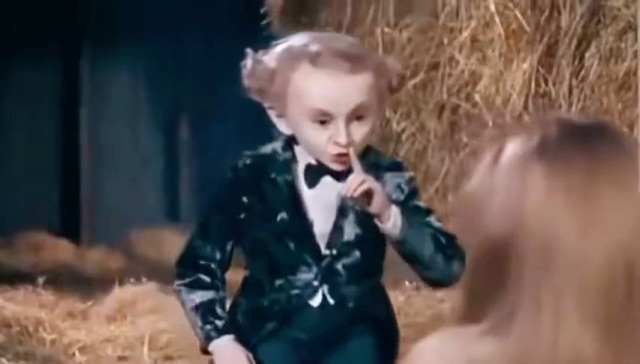
Timeline: the DANCER stares into the lens, makes a "shh" gesture, then breaks into a sly smile. Cut to the PARTNER with wide eyes and an open mouth. Medium shot of the DANCER with arms spread, knees bending, shoulders swaying. Low shot of the DANCER tiptoeing through the straw while the PARTNER keeps watching.
Camera: quick cuts between medium shots and close-ups.
Sound: instrumental bouncy beat, no vocals, no speech.
Realistic motion, no captions, no logos, no watermark.
How to use it
- Attach your two photos as reference images in the order Dancer, then Partner, and paste the prompt. Name the images as Image 1 and Image 2 if your tool asks for tags.
- Use one sharp, front-facing face per photo; the photo guide lists what works.
- Tools change often, so check the length and aspect ratio your tool supports and adjust the first line.
Questions people ask
Does the prompt name a song or an artist?
No. It asks for an instrumental beat only. To use the real track, add the official sound in TikTok when you post.
Will the result match the meme exactly?
Not exactly. Faces, motion and timing change with the tool, the model version and your photos. Treat the prompt as a starting point.
Do I have to write a prompt on this site?
No. Tip Toe AI uses a fixed template, so you only add two photos and press the make button.
Make your own Tip Toe video
Upload two photos and try a free 5-second preview. No subscription, no watermark.
Make my video