My Ride Is Here prompt for Seedance: a timed shot list without names
Updated:
Short answer
Paste the prompt below into Seedance and add your photo as the reference image. It reads as a short timeline with a camera line and a sound line, and it names no person, brand or account, because tools filter them. Set the first line to your plan's clip length, or use Tip Toe AI.
The prompt
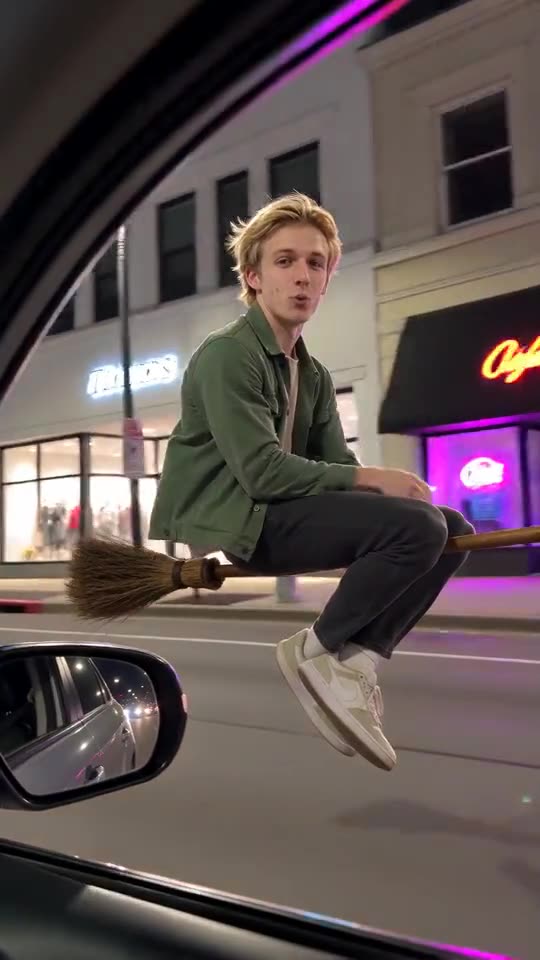
Make a 10-second vertical clip from the reference image, as if filmed on a phone from the passenger seat of a slowly moving car, aimed out of the open side window.
Image 1 is the RIDER: keep the face, skin tone, hair, body shape and clothing. If the subject is an animal, a toy or a drawn character, keep its look and let it grip the broom handle.
Setting: a city street at night lined with glowing shop windows, neon signs and street lamps, the lights of other cars streaking by. No logos, no readable text.
Timeline: 0-5.5s the RIDER sits side-saddle on an old wooden broom with a straw end, floating a metre above the road right beside the car at window height, close to the window and large in the frame, keeping pace with it, legs crossed. 5.5-8s still beside the window, the RIDER calmly turns their head, looks into the camera with a relaxed, slightly smug expression and gives a small casual wave. 8-10s the RIDER looks forward again just in time to hit a roadside traffic sign, tumbles comically onto the grass with the broom landing beside them, and sits up dazed but unhurt.
Camera: one handheld phone shot, the window frame and the side mirror at the edge of the picture, slight shake, no cuts.
The broom is plain wood and nothing else carries the RIDER. No wires.
Sound: wind, car engine and a light, playful, spooky instrumental tune, no singing.
Realistic motion, no captions, no logos, no watermark.
Tips for using it
- Add your photo as Image 1, and label it Image 1 if your tool asks for tags.
- For the fly-away ending, swap the last timeline beat for this: the RIDER snaps the broom up and shoots into the sky over the rooftops.
- Keep names, brands and accounts out of the timeline. They tend to be filtered, so the timeline shows the action and nothing more.
- Plans and limits differ between tools and change often. Set the first line to the clip length and shape your plan allows.
Questions people ask
What model makes the videos on this site?
The videos here come from Seedance 2.0 Mini by ByteDance through an API. This page is independent, though, and not affiliated with ByteDance or the people who posted the clips.
Will the clip be identical to the trend?
No. Every tool and model version reads the timeline differently, and your photo changes the face and the movement, so use the prompt as a starting point.
Is a prompt needed to use Tip Toe AI?
No. Tip Toe AI runs a fixed scene: add one photo and press the make button.
Make your own My Ride Is Here video
Upload one photo and make your own video. No subscription, no watermark.
Make my video