Hit the Road Dude AI prompt for Kling: paste-ready script, no real names
Updated:
Short answer
Paste the prompt below into Kling, add a photo of your driver as the reference image and generate. It gives the scene, a shot list with hard cuts and each spoken line at its time, and it names nobody from the original clip and no vehicle brand. Expect a few attempts, or let Tip Toe AI handle it.
The prompt
Image-to-video, 9:16, roughly 15 seconds.
Reference image 1 is the DRIVER. Keep the DRIVER's face, hair or fur, skin tone, body shape and clothing exactly as shown, and never turn the DRIVER into somebody else. If the DRIVER is an animal, keep its species: it sits upright in the driver's seat, front paws on the steering wheel, and talks with comically expressive mouth movements.
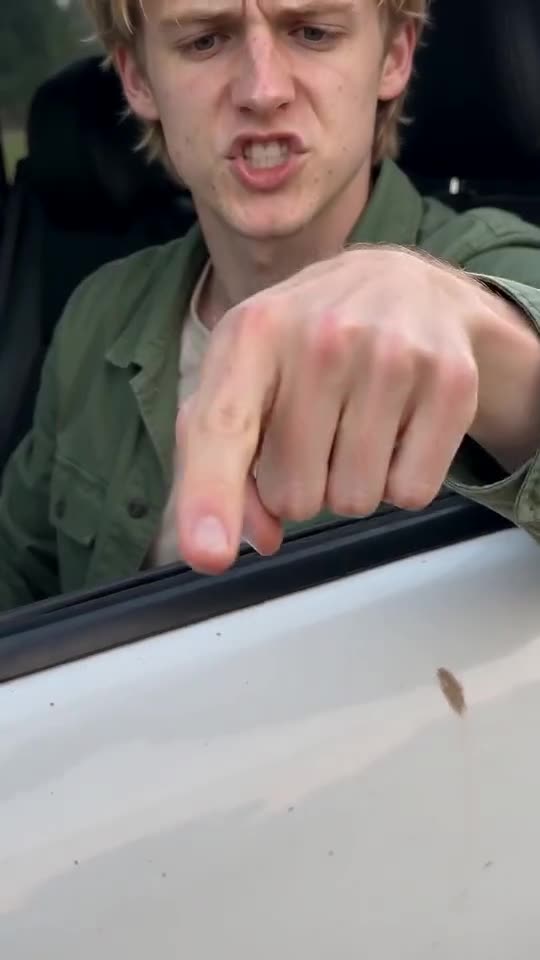
Scene: it looks as if someone standing next to a parked vehicle filmed it on a phone. A grassy bank beside a calm country pond in the afternoon, a dirt track, tall trees. The DRIVER sits in a plain white pickup truck that has just stopped, driver's side toward the camera, window open. The vehicle is generic: no badges, no logos, no readable plate.
Camera: one handheld phone at standing height, a metre or two from the driver's door, slight natural shake, with hard cuts between a wide shot, a close-up of the hand on the window sill, a medium shot and a tight close-up of the face. Whoever holds the phone stays off camera.
Shots: 0-4 s wide shot of the driver's side; 4-5 s close-up of the DRIVER's hand on the sill, index finger aimed at the camera; 5-6.4 s wide shot; 6.4-7.4 s medium shot, pointing at the camera; 7.4-10.5 s wide shot, pointing down and waving the person away; 10.5-11.8 s medium shot; 11.8-13.3 s wide shot, pointing at the camera once more; 13.3-15 s tight close-up of the DRIVER's face.
Dialogue (the DRIVER is animated the whole time and talks with their hands; the lips move in sync with the DRIVER's own lines): 0-2 s DRIVER, gruff: "Who told you you could fish here?" 2-4 s an off-camera young man, unsure: "I thought it was state property." 4-4.8 s DRIVER: "State?" At 4.8 s the man: "Yeah." At 5.3 s DRIVER: "This?" At 5.9 s the man: "Yeah." At 6.4 s DRIVER: "State?" 7.8-12.3 s DRIVER: "Hit the road, dude. This ain't no state property, this is private property." At 12.2 s the man: "Oh, okay." 12.8-15 s DRIVER: "What is your name anyway? I want your name."
Audio: only the spoken lines, quiet ambient sound from the place and a softly idling engine. No music.
Photorealistic, no text, no subtitles, no logos, no watermark.
Tips for using it
- Add your Driver photo as reference image 1. For another place, change the verb in the first line: fish, play or park.
- Keep real names out. The prompt describes a generic driver and a generic white truck, so nobody from the original clip is imitated.
- Speech and lip sync depend on the tool and the model version. If a line gets dropped, run it again, and check the clip length and aspect ratio your tool supports.
Questions people ask
Why doesn't the prompt name the man in the clip?
Tools may refuse prompts that name a real person, and using a real name or likeness can infringe their rights, so the prompt describes a generic driver. This page is independent of the original poster.
Is the output going to match the meme exactly?
No. Faces, voices and timing change with the tool, the model version and your photo. Use the prompt as a starting point.
Do I have to write a prompt on Tip Toe AI?
No. Tip Toe AI runs a fixed scene: you add one photo and press the make button.
Make your own Hit the Road Dude video
Upload one photo and make your own video. No subscription, no watermark.
Make my video