Why do vampires keep appearing in Spooky Scary Skeletons videos?
Updated:
Short answer
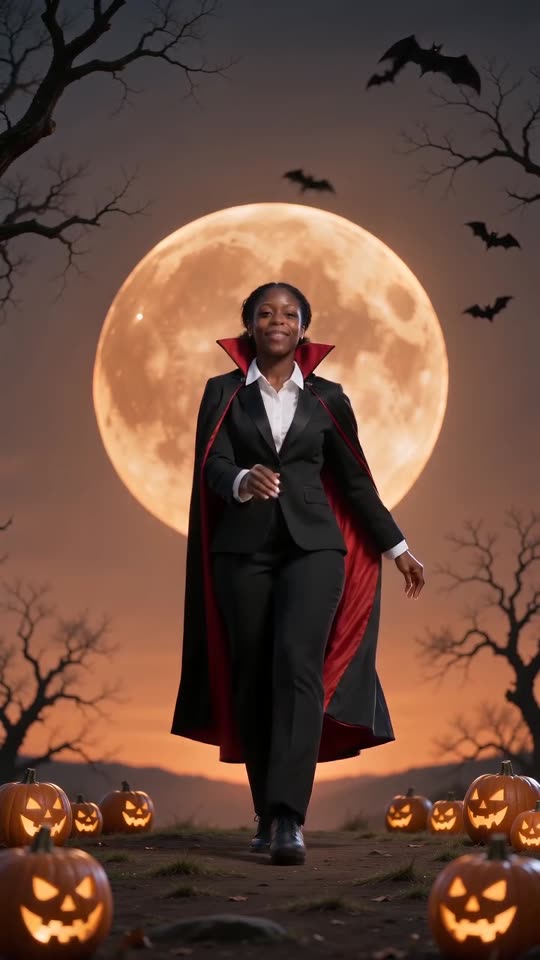
It's the 2026 remake of the old dance: an AI vampire wearing a black suit and a red-lined cape moves beneath a vast orange moon, ringed by bats, bare trees and pumpkins. Anime fans kicked it off in early October. From a single photo of you or your pet, Tip Toe AI recreates it.
How the anime fan edits were built
Editors first turned a character into a caped vampire with an AI image tool. They animated that picture into a short dance, set it against an orange-moon Halloween backdrop and cut it into a rapid montage of manga panels and anime scenes. One early example appeared on 8 October 2026, and a 10 October version collected around 2.8 million views.
That same day a CapCut tutorial walked through the process, which helped the format travel.
Where Tip Toe AI does it differently
- Put in a photo and take out a complete clip, with no green screen and no editor layers.
- The scene already includes the suit, the cape, the moon, the bats and the pumpkins.
- The dancing goes on for all 11 seconds, not a brief insert.
- The face is yours, never a copyrighted character.
Using the clip in a bigger edit
Save the clip and import it into CapCut or whichever editor you use, the way fan edits slot in their vampire shot. Shorten it, overlay text, or place it between other footage.
Questions people ask
Is my favourite anime character allowed as the vampire?
Not here. Famous characters are owned by someone else, so the photo check rejects them. A drawing of an original character you invented is allowed.
Why do all the edits show an orange moon and pumpkins?
They make it obvious at a glance that the edit is Halloween content. All Tip Toe AI videos share that backdrop.
Is the dance in the vampire version unchanged?
Yes. Kicks, stiff elbows, hip shakes: it's the identical dance, just with a cape on.
Your own Spooky Scary Skeletons clip starts here
Send in a single photo and a vampire dance with your face comes back. No watermark, nothing to subscribe to.
Make my video